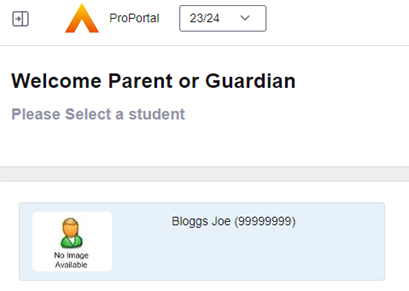
1 - Log into ProPortal and select the child you wish to submit an absence for: | |
2 - Open the Information menu and select 'Submit Absence' | 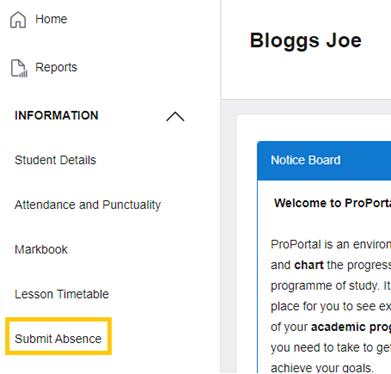 |
3 - Complete the Absence form | 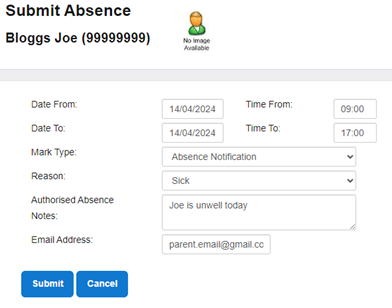 |
4 - Form Step-by-Step: | Dates - Set dates 'from' and 'to' as the dates in which the student will be absent. If you are unsure what the duration of the absence will be (i.e. for sickness), you will need to submit an absence each additional day that the student is absent for. Times - If the student will be absent for the full day, please enter 9:00 - 17:00. If the student will be absent for less than a full day, please enter the specific times they will be absent. Mark type - Please always select 'Absence Notification' Reason - Please choose the relevant option from the drop-down list. Authorised Absence Notes - Details about the absence reason must be provided here |
5 - Upon submission, a confirmation is displayed and a copy will be sent to your email address | 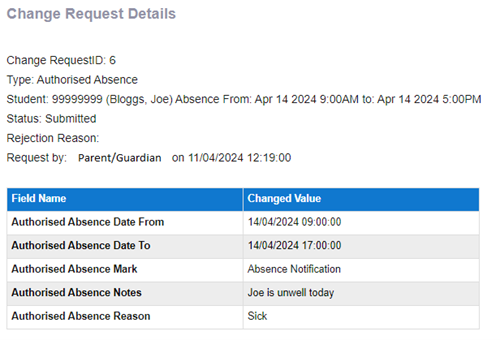 |